
Claude Meetings Explained: How Anthropic Is Turning Workplace Discussions Into Real-Time Action Plans

Artificial intelligence is moving beyond conversational assistance and becoming an active part of everyday business operations. The latest expansion of Anthropic's Claude platform illustrates this transition, introducing tools designed to help teams transform discussions into deliverables, organize information, analyze business data, and collaborate across workplace applications.
On November 10, 2026, Anthropic announced a new collection of productivity features, including Claude Sheets, Claude Whiteboards, Claude Data, and upgraded interactive connectors. It also introduced Claude Meetings in beta for Team and Enterprise customers, enabling Claude to participate in supported video calls and help teams develop plans, timelines, meeting notes, and action items while discussions are taking place.
The announcement reflects a broader shift in enterprise software. Rather than requiring employees to move between separate applications for meetings, spreadsheets, presentations, data analysis, and project management, AI platforms are increasingly attempting to bring these activities into a unified working environment.
Anthropic's strategy also places Claude in more direct competition with productivity ecosystems from Microsoft, Google, OpenAI, and Meta. As AI companies develop tools for knowledge work, the competitive question is changing. It is no longer simply about which assistant can generate the best response, but which platform can help organizations complete meaningful work with less friction.
The implications extend across finance, legal services, marketing, human resources, software development, customer success, and executive management. Claude's latest capabilities offer an indication of how AI-native workplace software could evolve, while raising important questions about security, governance, accuracy, and the changing role of human employees.
Claude's Evolution From AI Assistant to Workplace Productivity Platform
The conventional workplace software model is organized around individual applications. Employees use video conferencing tools for meetings, spreadsheets for financial calculations, documents for reports, whiteboards for brainstorming, and dashboards for business intelligence.
Although these applications are interconnected through integrations, employees still spend considerable time transferring information between them.
A meeting produces decisions that must be converted into documents. A spreadsheet generates figures that must be incorporated into a presentation. Customer information stored in a CRM must be reviewed before a sales call. Project discussions need to become tasks in a project management system.
This fragmentation creates administrative overhead and increases the possibility of information being lost between stages.
Anthropic's latest Claude features address this problem by allowing users to create and modify different workplace artifacts within the same AI environment.
The platform now brings together several capabilities:
Claude Meetings for real-time meeting assistance.
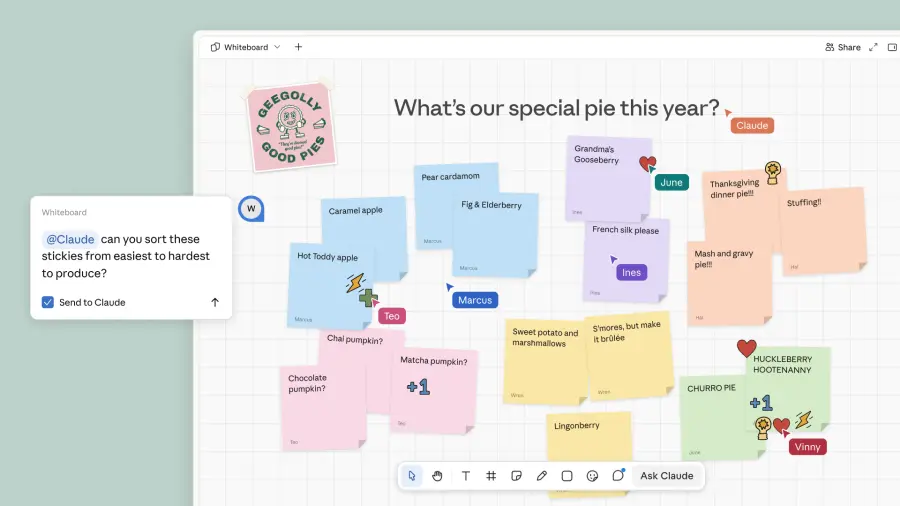
Claude Whiteboards for collaborative planning and visual organization.
Claude Sheets for spreadsheet creation and editing.
Claude Data for business intelligence and data visualization.
Interactive connectors for working with external business applications.
Existing document, presentation, and design generation capabilities.
Claude Motion, in beta, for converting content into short animations.
The strategic value lies in the connections between these functions. Information generated in one workflow can potentially become the foundation for another without requiring employees to repeatedly explain the same context.
This moves Claude closer to an AI-powered workspace rather than a standalone chatbot.
Claude Meetings: Turning Conversations Into Real-Time Business Execution
Meetings are central to organizational decision-making, but their outcomes frequently require substantial work after participants leave the call.
Employees must organize notes, identify responsibilities, prepare timelines, update project documents, and distribute follow-up actions. These activities can delay execution, particularly when several departments are involved.
Claude Meetings is designed to reduce this gap between discussion and implementation.
The feature allows Claude to join a video conference as a visible participant. During the conversation, it can follow the discussion, respond to questions in the meeting chat, retrieve relevant information through connected applications, and begin producing materials that reflect the team's decisions.
For example, a product development meeting could involve discussing a new feature, reviewing previous performance figures, assigning responsibilities, and agreeing on a launch schedule. Claude can help turn those discussions into a working plan, create a timeline, and organize relevant information while the conversation continues.
The resulting notes, action items, and generated materials remain available through claude.ai after the meeting.
From Meeting Notes to Operational Deliverables
The most important distinction is that Claude Meetings is intended to support work during the meeting rather than merely document what happened.
Its potential applications include:
Project management: Converting discussions into tasks, deadlines, and ownership assignments.
Financial planning: Retrieving historical figures and organizing proposed budgets.
Marketing: Building campaign timelines and documenting creative decisions.
Product development: Translating feature discussions into requirements and implementation plans.
Executive management: Organizing strategic priorities and tracking decisions.
Customer operations: Preparing follow-up materials based on meeting discussions.
The feature also includes participation safeguards. Claude identifies itself as a meeting participant and posts a notification in the meeting chat. It will not join calls containing external guests unless an administrator authorizes it, and it automatically leaves if an external guest joins.
At launch, Claude Meetings is available in beta for Team and Enterprise plans and works with Google Meet. Support for additional plans is expected to follow.
These controls are important because workplace conversations may contain confidential business information, customer details, financial discussions, or internal strategic decisions.
Claude Whiteboards: Connecting Brainstorming With Structured Planning
Whiteboards have traditionally provided a flexible environment for teams to explore ideas, map relationships, and organize complex problems.
However, the information created during brainstorming sessions often remains difficult to reuse. Teams may need to manually convert diagrams and notes into formal documents, presentations, or project plans.
Claude Whiteboards introduces AI assistance directly into this process.
Teams can discuss an idea and use Claude to organize the resulting information into a collaborative visual workspace. The system can structure concepts, develop timelines, identify deadlines, and help summarize the conclusions reached during a discussion.
The feature also works with Claude Meetings, allowing a whiteboard to develop as participants exchange ideas.
This connection could improve several types of collaborative work.
For example, a marketing team planning a product launch could begin with a broad brainstorming session. Claude could help group ideas into campaign themes, organize activities by timeline, and identify dependencies between different tasks.
A product team could use the same approach to map customer requirements, define features, and organize development priorities.
After the discussion, the resulting whiteboard can become the basis for a document or slide presentation.
The broader opportunity is to reduce the distance between creative thinking and formal execution. Instead of treating brainstorming as a separate activity, organizations can turn the ideas generated during collaboration into structured business artifacts.
Claude Sheets: Bringing AI Into Spreadsheet Creation and Analysis
Spreadsheets remain essential to business operations because they provide a flexible way to organize information, calculate figures, model scenarios, and monitor performance.
Yet creating and maintaining spreadsheets can be time-consuming, particularly when users need to develop formulas, organize multiple worksheets, apply consistent formatting, and maintain complex trackers.
Claude Sheets allows teams to create and collaboratively edit spreadsheets through natural-language instructions.
A user could request a campaign tracker, hiring budget, or operational planning spreadsheet. Claude can generate the initial structure, organize information across multiple tabs, create formulas, apply formatting, and introduce dropdown menus.
Importantly, the feature also supports continued editing. Claude can make changes directly within spreadsheet cells and explain what it has modified, allowing users to review its work.
Practical Business Applications of Claude Sheets
Business function | Potential application | Operational benefit |
Finance | Budget planning and financial trackers | Faster spreadsheet preparation |
Human resources | Recruitment and hiring budgets | More organized workforce planning |
Marketing | Campaign performance tracking | Centralized campaign information |
Sales | Pipeline and account tracking | Improved visibility into opportunities |
Operations | Project and resource monitoring | More consistent reporting |
Management | Performance and KPI tracking | Faster access to structured information |
The feature could make spreadsheet-based workflows more accessible to employees who understand their business requirements but do not have advanced spreadsheet skills.
However, financial and operational spreadsheets still require careful validation. A formula error, incorrect assumption, or improperly structured dataset can influence important decisions.
AI-generated calculations should therefore remain reviewable, particularly when used for financial reporting, forecasting, compliance, or executive decision-making.
Claude Data: Bringing Business Intelligence Into Conversational Workflows
Business intelligence systems help organizations understand performance through data warehouses, customer relationship management platforms, and analytical dashboards.
The challenge is that accessing meaningful insights often requires specialized technical knowledge. Employees may need to understand database structures, query languages, data definitions, and visualization tools before they can answer relatively straightforward business questions.
Claude Data, previously known as Claude Dashboards, aims to make this process more accessible.
The feature connects Claude to systems such as Snowflake and Salesforce. Users can ask questions about organizational data and receive dashboards, written data stories, or narrated videos.
One important aspect is support for definitions certified by a company's data team, available in beta. This can help ensure that Claude interprets business metrics according to established organizational definitions rather than making independent assumptions about what particular figures represent.
For example, two departments may calculate customer retention differently. A certified definition can help maintain consistency when employees ask questions about the same metric.
From Static Dashboards to Interactive Business Intelligence
Traditional dashboards generally present predefined indicators. Users can filter information and explore available visualizations, but answering a new question may require additional analytical work.
Conversational business intelligence introduces a different interaction model.
A manager could ask why a particular sales region is underperforming, request a comparison with an earlier period, and ask for a visual explanation of the findings.
The system can potentially turn this analysis into a written narrative or a short narrated video.
This approach could help organizations distribute analytical capabilities beyond dedicated data teams.
Nevertheless, reliable business intelligence depends on data quality, access controls, accurate metric definitions, and appropriate interpretation. A visually compelling dashboard is not necessarily evidence of a correct conclusion.
Human review remains important when decisions involve financial performance, staffing, investment, or business strategy.
Interactive Connectors: Bringing Enterprise Applications Into Claude
One of the most strategically important elements of Anthropic's announcement is the expansion of interactive connectors.
Claude already uses connectors built around the Model Context Protocol (MCP), an open standard introduced by Anthropic for connecting AI systems to external tools and information sources.
The company says Claude Marketplace lists more than 9,000 connectors and plugins, including community-built integrations.
Interactive connectors take this approach further by allowing partner applications to appear directly inside Claude.
Users can work with applications such as Adobe and Atlassian without constantly switching browser tabs. Additional integrations include plugins from Salesforce, NetSuite, and Workday, with some identified as being in beta.
These integrations are designed to support specialized workflows.
Sales professionals can prepare for customer conversations.
Accountants can analyze financial information.
Human resources teams can manage time-off and expense processes.
Creative professionals can work with design applications.
Project teams can coordinate work through connected enterprise tools.
The strategic significance is that Claude becomes an interface through which employees interact with existing software rather than a replacement for every application.
This distinction matters commercially. Enterprises have invested heavily in established systems, and replacing them would be expensive and disruptive. An AI layer that connects existing applications may offer a more practical route toward workplace automation.
How Anthropic Is Competing With OpenAI, Microsoft, Google, and Meta
The workplace AI market is becoming increasingly competitive.
Anthropic's announcement follows OpenAI's September 2026 introduction of productivity tools designed to help users collaborate with ChatGPT on tasks such as visualizing company information and creating presentations.
Meta has also entered the collaboration space with its Muse AI agent, which can build small applications to help users complete specific tasks.
Microsoft and Google already operate extensive workplace software ecosystems, giving them established distribution channels across communication, productivity, storage, and enterprise applications.
The competitive landscape is increasingly defined by how deeply AI can integrate into everyday workflows.
Company | Workplace AI direction | Strategic focus |
Anthropic | Claude Meetings, Sheets, Whiteboards, Data, interactive connectors | AI-assisted knowledge work and connected applications |
OpenAI | ChatGPT workplace tools and agent capabilities | Collaborative productivity and task execution |
Microsoft | Microsoft 365 and Copilot ecosystem | AI integrated into established enterprise software |
Workspace and Gemini capabilities | AI-assisted communication, documents, and collaboration | |
Meta | Muse AI agent and application-building capabilities | Task-specific AI experiences and collaboration |
The distinction between these platforms will increasingly depend on integration quality, enterprise adoption, security, reliability, and the ability to complete tasks rather than simply generate content.
Anthropic's approach emphasizes bringing context, artifacts, and connected applications into a single environment.
OpenAI's strategy is also moving toward workplace productivity, while Microsoft and Google benefit from their established positions in enterprise software.
The market is therefore not simply a competition between AI models. It is a contest over the future interface through which people interact with digital work.
Real-World Productivity: What Enterprise Adoption Reveals
Anthropic also shared examples of how its own teams and customers are using Claude to improve operational workflows.
These examples illustrate that AI productivity is not restricted to software engineering. Legal, finance, product management, sales, and customer-facing teams can also build tools around their existing expertise.
Legal Operations at Anthropic
Anthropic's legal team developed a Slack-based review tool with Claude that uses the team's internal playbook to identify and suggest contractual redlines.
The company reported that marketing reviews that previously took three days were reduced to 24 hours. Straightforward corrections can be made before a lawyer reviews the document.
The example demonstrates how AI can reduce repetitive review work while preserving professional oversight.
Financial Planning at Advantage Solutions
Advantage Solutions reported that its financial planning and analysis team previously spent approximately 10 hours per forecasting cycle preparing presentations, commentary, and validation materials.
After automating much of this assembly work with Claude, the process reportedly took less than 30 minutes.
The significance is not simply faster document preparation. It allows finance professionals to devote more attention to interpreting financial performance and supporting management decisions.
Product Development at Datadog
Datadog described using Claude to accelerate the transition from product ideas to feature briefs, product requirement documents, and testable prototypes.
This can help product managers spend more time understanding customer needs and evaluating product decisions rather than manually preparing every intermediate document.
Contract Preparation at Gusto
A member of Gusto's commercial legal team built a tool that converts negotiated terms into contracts ready for signature.
The company reported that turnaround times declined from more than a week to hours, while the employee continued reviewing negotiated agreements.
This example highlights the potential for domain experts to create useful internal tools without needing to become software developers.
Customer Success at HubSpot
HubSpot described using Claude with customer relationship data to prepare customer success managers for calls.
Connected dashboards help identify relevant customer information and potential follow-up priorities. The company also reported that follow-up emails can be drafted within 30 minutes after a meeting ends.
Across these examples, a consistent pattern emerges: AI can automate preparation and coordination, allowing employees to focus more heavily on judgment, relationships, and decisions.
Enterprise Security, Governance, and Data Protection
As Claude gains access to more workplace systems, security and governance become increasingly important.
An AI assistant that can retrieve documents, edit spreadsheets, interact with CRM systems, and participate in meetings must operate within carefully defined boundaries.
Anthropic has introduced several enterprise controls intended to support this requirement.
Enterprise administrators can determine which products and connectors employees are permitted to use and establish organizational spending limits.
Claude also operates within the permissions already assigned to connected applications. Administrators can restrict the capabilities of individual connectors, allowing Claude to read information from a system without necessarily granting permission to send messages or perform other actions.
Claude Auto-Connect
Anthropic introduced Claude auto-connect in beta for eligible Team and Enterprise plans.
The feature allows administrators to establish connections to applications such as Notion, Atlassian, and Dropbox through a one-time setup. Employees can then access the connected tool when they first use it through Claude, rather than configuring every connection individually.
This simplifies onboarding, but centralized access management remains essential.
Enterprise Data Protection
Anthropic identifies several security measures supporting enterprise deployments:
Enterprise organization data is encrypted both in transit and at rest.
Audit logs and a Compliance API provide visibility into Claude usage.
The Compliance API works with more than 100 security and compliance tools, including Splunk and CrowdStrike.
Enterprise cloud sessions run in isolated virtual machines.
Connector credentials are maintained outside the isolated session environment.
These controls are important because AI systems can introduce new pathways through which sensitive business information is accessed or modified.
Organizations should still establish policies governing confidential information, employee access, connector permissions, data retention, and approval for consequential actions.
AI productivity should not come at the expense of security or regulatory accountability.
The Challenges of Building an AI-Native Workplace
Despite the benefits, an integrated AI workspace introduces several operational challenges.
Accuracy and verification: AI-generated spreadsheets, reports, and project plans can contain errors. Organizations need review processes appropriate to the importance of each deliverable.
Data fragmentation: Connecting multiple systems does not automatically guarantee consistent information. Conflicting records and outdated documents can produce misleading conclusions.
Permission management: Broad connector access can increase the consequences of compromised accounts or poorly configured agents.
Employee adoption: Workers need to understand how to use AI effectively and when to rely on professional judgment instead of automated output.
Workflow dependence: Organizations that rely heavily on a single AI platform may face operational disruption if the service becomes unavailable or its pricing and capabilities change.
Accountability: Businesses must establish who is responsible when an AI-generated document, calculation, recommendation, or action causes a problem.
The most effective workplace deployments will combine automation with clear accountability. AI should reduce administrative work while keeping important decisions understandable and reviewable.
The Future of Work Is Moving Toward Connected AI Execution
Anthropic's expansion of Claude represents a significant development in the evolution of workplace AI. Meetings, spreadsheets, whiteboards, dashboards, and enterprise connectors are becoming part of a more integrated environment in which information can move between different forms of work.
The introduction of Claude Meetings, Sheets, Whiteboards, and Data demonstrates how AI platforms are moving beyond conversational assistance toward coordinated business execution.
The productivity examples shared by Anthropic and its customers suggest that the benefits can extend across legal operations, financial planning, product development, and customer success. However, long-term adoption will depend on accuracy, security, governance, and the ability to integrate reliably with existing enterprise systems.
For technology leaders, including Dr. Shahid Masood and the expert team at 1950.ai, this development highlights an important direction in the AI industry: the next generation of workplace platforms may be defined less by how intelligently they answer questions and more by how effectively they help people transform ideas into completed work.
Key Takeaways
Anthropic announced Claude Meetings, Claude Sheets, Claude Whiteboards, Claude Data, and expanded interactive connectors on November 10, 2026.
Claude Meetings can participate in supported Google Meet calls, helping teams develop notes, plans, timelines, and action items during discussions.
Claude Whiteboards provides collaborative visual planning and can convert ideas into documents or slide presentations.
Claude Sheets supports spreadsheet creation, formulas, multiple tabs, formatting, dropdown menus, and collaborative editing.
Claude Data connects to systems such as Snowflake and Salesforce to generate dashboards, data stories, and narrated videos.
Interactive connectors bring applications such as Adobe and Atlassian into Claude, while additional integrations include Salesforce, NetSuite, and Workday.
Claude Marketplace lists more than 9,000 connectors and plugins, according to Anthropic.
Anthropic reported that its legal team reduced marketing review turnaround from three days to 24 hours.
Advantage Solutions reported reducing financial forecasting preparation work from approximately 10 hours to under 30 minutes.
Enterprise controls include encryption, audit logs, connector permissions, isolated cloud sessions, and administrative spending limits.
Claude's expansion reflects intensifying competition among Anthropic, OpenAI, Microsoft, Google, and Meta to shape the future of workplace productivity.
Future Outlook
The workplace is gradually moving toward a model in which employees describe objectives, collaborate with AI systems, and review completed outputs rather than manually transferring information between applications.
Anthropic's latest Claude features provide an example of this transition. As AI agents become more capable of coordinating meetings, data, documents, and external software, the traditional boundaries between workplace applications may become less important.
The next stage will depend on how reliably these systems can maintain context, protect sensitive information, validate their outputs, and operate within enterprise governance requirements.
The long-term opportunity is an AI-native workplace where technology handles more of the repetitive coordination involved in knowledge work, allowing people to devote greater attention to creativity, expertise, strategic thinking, and meaningful decisions.
Further Reading / External References
More ways to work with Claude: Sheets, Whiteboards, and Interactive Connectors
Anthropic launches Claude Meetings to turn workplace discussions into plans and tasks


Comments